
Social Tools
Free Instagram Reel Downloader
Download Instagram Reels as MP4 online for free. Paste a Reel link to preview and save without watermark — fast and no app required.


Other Social Tools
About Instagram Reel Downloader
This free Instagram Reel Downloader is built only for short-form Reels. Paste a public instagram.com/reel/… or /reels/… link, preview the clip in your browser, then save it as an MP4 from the player menu — without an Instagram login, mobile app, or browser extension. For feed posts (/p/…) and other Instagram video formats, use the Instagram Video Downloader instead.
How to download an Instagram Reel
- 1
Paste the Reel URL
Copy a public instagram.com/reel/… link, paste it into the input, and click Fetch Reel.

- 2
Preview the Reel
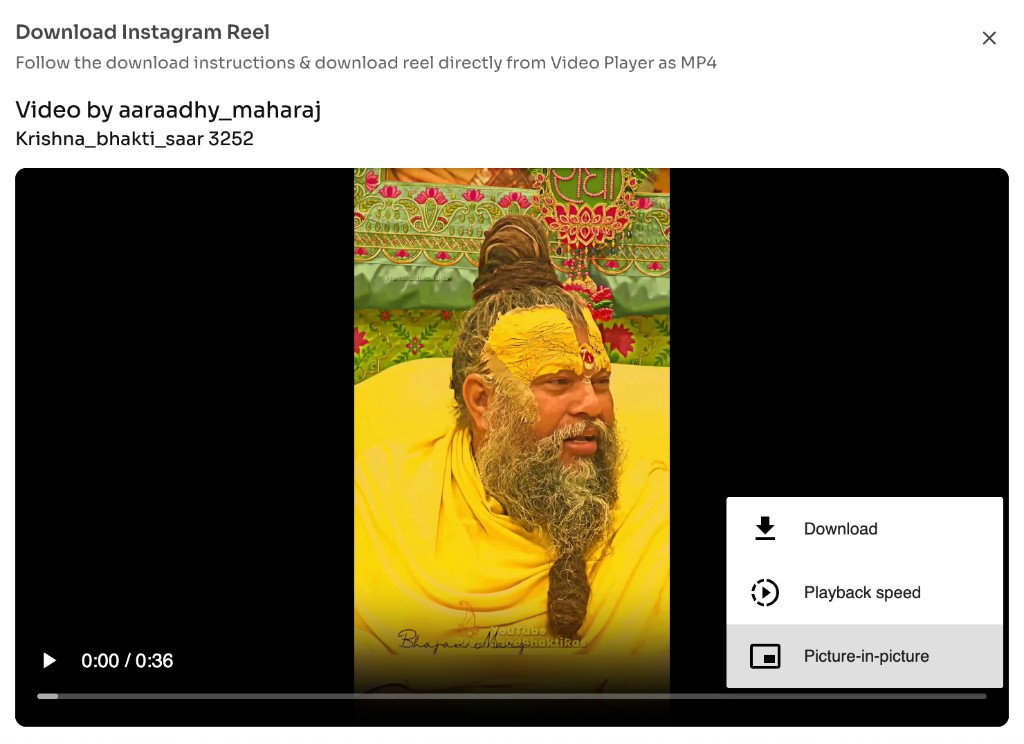
Wait for the preview player to load so you can confirm it is the right clip.
- 3
Download MP4
Open the video player menu (⋮) and choose Download to save the Reel as an MP4.
When to use this Reel Downloader
Instagram Reels disappear into a fast feed. Use this tool when you need a clean offline MP4 of a public Reel you own or have permission to keep — without installing an app or switching to a general Instagram video downloader.
Back up your own Reels
Save Reels you published so you have a local MP4 for portfolios, edits, or archive folders outside the Instagram app.
Reuse approved short-form clips
Download Reels you have rights to use for drafts, presentations, or reposts on platforms that accept vertical MP4 files.
Review Reels offline
Keep reference footage on your phone or laptop when you want to study pacing, captions, or hooks without staying logged into Instagram.
Skip posts and IGTV workflows
Choose this page when the link is clearly a Reel (/reel/ or /reels/). For /p/ posts or other Instagram videos, switch to the Instagram Video Downloader.
Features of Instagram Reel Downloader
Reel-only download flow
Purpose-built for instagram.com/reel/… and /reels/… links — including profile-prefixed paths like /username/reel/… — so the fetch step targets short-form Reels instead of mixed Instagram media.
In-browser Reel preview
After Fetch Reel, watch the clip in the on-page player before you save, so you confirm the right Reel from a crowded feed.
MP4 save from the player menu
Download directly from the video player controls (open ⋮ → Download). No separate converter app and no ToolsAndCalcs watermark added to the file.
No Instagram login required
Works on public Reel URLs in your browser. You do not need an Instagram account, password, or browser extension for this tool.
Phone and desktop friendly
The same paste → fetch → player-download path works in modern browsers on iPhone, Android, Mac, and Windows.
Free short-form MP4s
Save public Reels as widely compatible MP4 files online at no cost — ideal when you specifically need a Reel, not a feed post or longer Instagram video.
Know About Legality & Security
Downloading a Reel is only appropriate when you own the content, have permission, or otherwise have a lawful right to keep a copy. Public availability does not equal a license to redistribute.
Respect creator copyright
Reels are usually protected by copyright. Only save clips you created, licensed, or clearly have permission to keep. Do not republish someone else’s Reel as your own.
Follow Instagram’s Terms of Use
Use downloads in ways that comply with Instagram’s Terms of Use and local law. Unauthorized scraping, bulk harvesting, or commercial reuse of others’ Reels can violate those rules.
Public Reels only
This tool cannot access private accounts, restricted Reels, or deleted posts. If a link does not open publicly on Instagram, it will not download here.
No login or credentials collected
You paste a Reel URL — you are never asked for your Instagram password. Prefer that over third-party apps that request account access.
Browser-based downloads
The fetch and save flow runs through your browser session. Keep the tab open until the MP4 finishes downloading, and only use Reel links you trust.
Personal and permitted use
Offline viewing of Reels you own or have rights to is the intended use. Redistributing, selling, or re-uploading others’ Reels without permission is not.
Frequently asked questions - FAQs
Quick answers about Instagram Reel Downloader.
Yes. You can fetch and download public Instagram Reels as MP4 for free from this page.
Related tools